Saved Reply Templates for LinkedIn Comments & DMs with Manual Approval
I'd like to suggest adding a Saved Reply Templates feature to 2PR's Engage section, allowing users to create, organise and reuse pre-written responses for LinkedIn comments and direct messages (DMs), where supported.
Currently, Engage offers AI-generated replies, but users would also benefit from having full control over their own reusable responses, particularly when sharing resources, answering recurring questions or managing leads.
Proposed functionality:
Template Library: Create, edit, duplicate, categorise and save unlimited reusable replies.
Keyword Triggers: Detect keywords such as "Claude", "Codex" or "Grok" and suggest the corresponding saved template.
Manual Approval: Pre-fill the suggested response without publishing it. Users must explicitly click Reply or Send.
Personalisation: Support variables such as first name, post title and relevant resource links.
Comments & DMs: Make templates accessible from both LinkedIn comment conversations and private messages, where integration permissions allow.
AI + Saved Templates: Let users switch between AI-generated suggestions and their own pre-written responses.
Template Management: Add search, tags, folders and favourite templates for quick access.
Conversation Context: Show the original comment or message alongside the suggested response before sending.
Example use case:
I publish a LinkedIn post offering a free AI development framework. Readers comment or message me with "Claude", "Codex" or "Grok".
2PR recognises the keyword and suggests the appropriate saved response, including the relevant resource link. I can review, personalise and manually send it with one click.
UX recommendation:
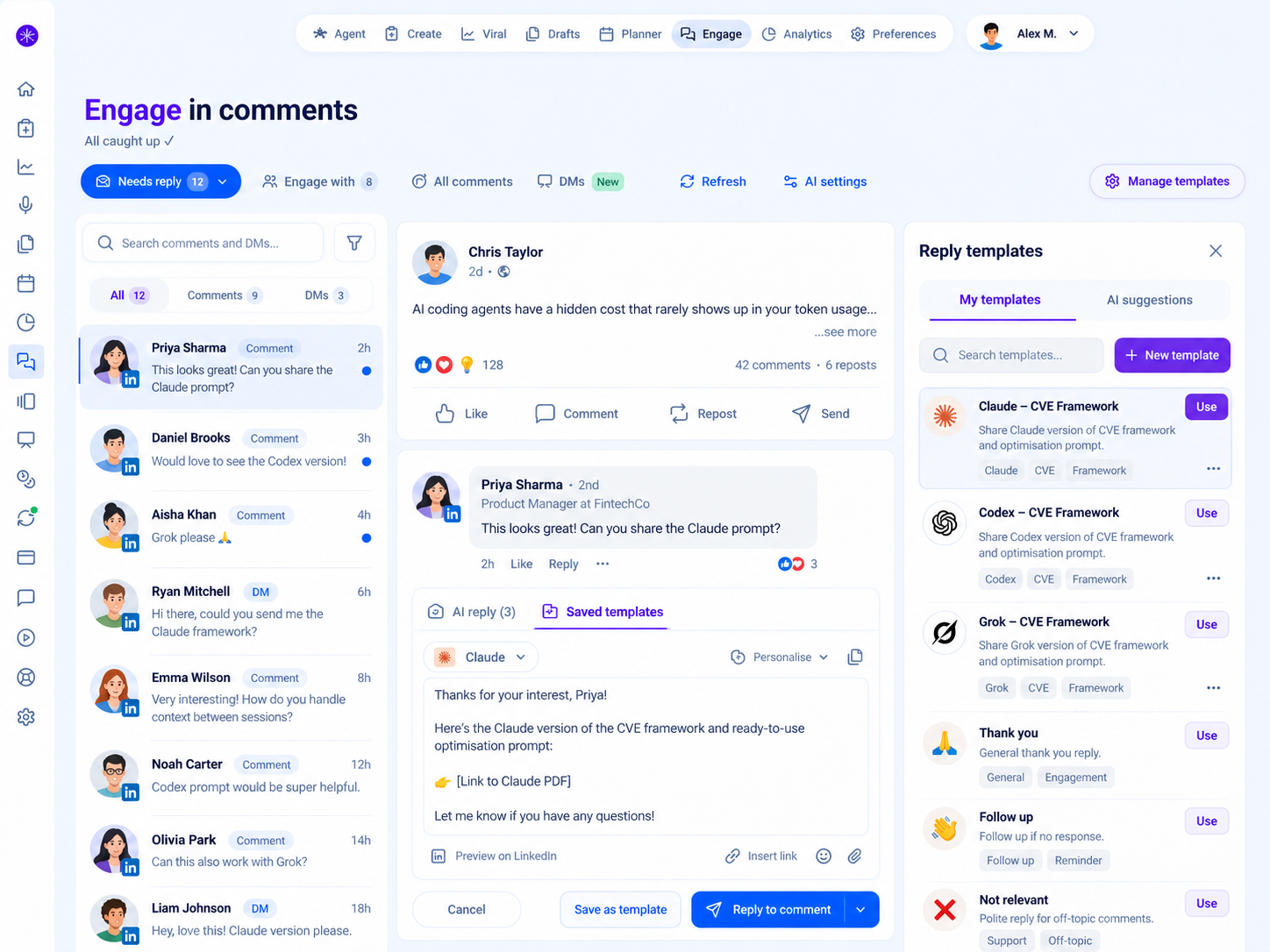
Integrate this directly into the existing Engage interface, using a three-column layout:
Left: Comments and DM inbox with filters.
Centre: Conversation context and editable reply composer.
Right: Searchable reply template library with one-click insertion.
The feature should match 2PR's existing design system and support responsive layouts, keyboard navigation and clear sending states.
Expected benefits:
Faster responses to recurring questions.
More consistent and accurate communication.
Less repetitive typing and unnecessary AI generation.
Better handling of inbound leads and resource requests.
Greater user control, with no risk of unintended automatic replies.
The key requirement is that keyword recognition only suggests or pre-fills responses. Nothing should be published without explicit user approval.
This would make Engage much more useful for creators, founders, consultants and businesses managing LinkedIn conversations while preserving authentic, human-controlled engagement.
Log in to comment and vote
No comments yet
Be the first to share your thoughts.